Hey there! If you've ever wondered how AI systems can seamlessly connect to tools like Gmail, GitHub, or Slack without a ton of custom coding, you're in the right place. Today, we're diving deep into the Model Context Protocol (MCP), honestly, one of the more exciting things happening in the AI space right now. By the end of this blog, you'll know exactly what MCP is, how it works, why it's useful, and how it's different from AI Agents. Let's get into it!
What is MCP? A Simple Explanation
Okay, so imagine you're trying to charge your phone, but every device you own, your laptop, speaker, power bank, needs a different cable. Annoying, right? Now imagine if there was one universal cable, like USB-C, that just worked with everything. That's basically what MCP does for AI systems. It's a universal plug that lets AI connect to any tool, app, or data source without needing custom code for each one.
MCP, or Model Context Protocol, is a set of rules (a protocol) created by Anthropic to make it easy for AI systems, chatbots, coding assistants, and custom apps, to talk to the outside world. Think of it as a middleman that helps AI access tools like Gmail, Google Docs, GitHub, Slack, or even your local files, all in a standard, reusable way.
How Does MCP Work?
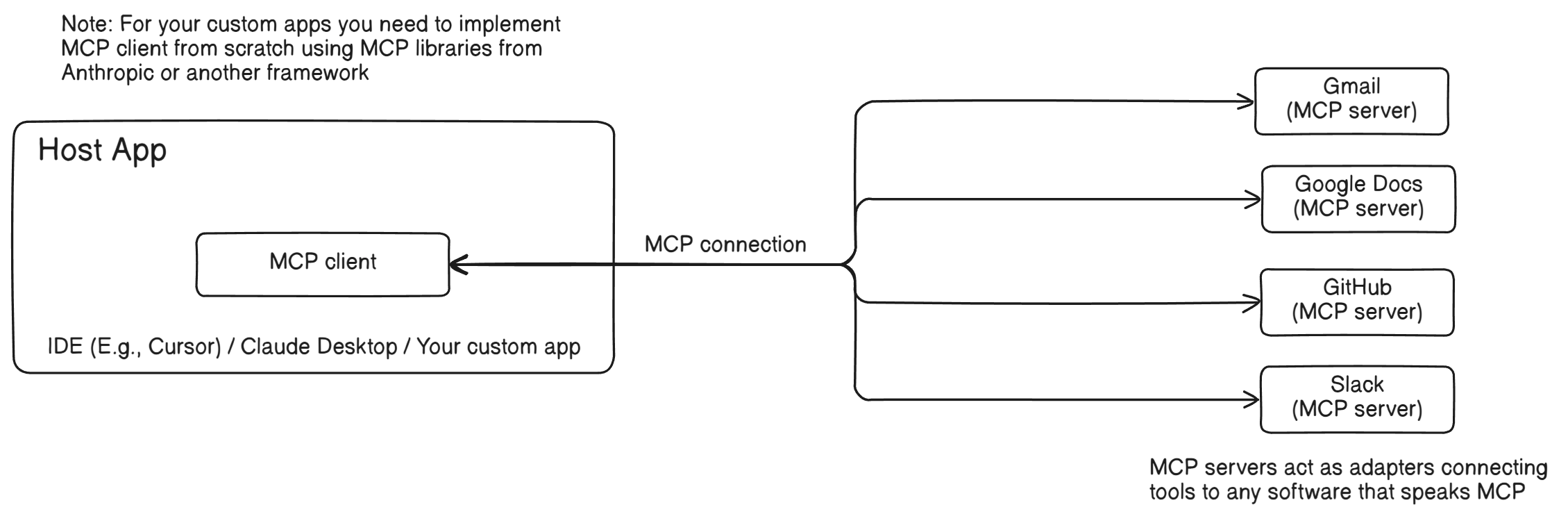
MCP splits the connection process into two main parts: the MCP client and the MCP server. Here's how they work together:
MCP Client - This lives inside your AI app, whether that's an IDE like Cursor, Claude Desktop, or something you're building yourself. The client is what actually talks to the tools. If you're building your own app, you'll need to add an MCP client using libraries from Anthropic or another framework.
MCP Server - This is the "adapter" for a specific tool, like Gmail or GitHub. It's a small program that connects the tool to the MCP system, translating what the AI wants (say, "fetch my emails") into something the tool actually understands (a Gmail API call). Each tool needs its own MCP server, and thankfully, the community has already built a ton of them for things like Gmail, Slack, Notion, and more.
Here's the basic flow:
- Your AI app (with an MCP client) sends a request, like "list my GitHub repos."
- The MCP client talks to the GitHub MCP server using the MCP protocol.
- The GitHub MCP server fetches the repos and sends them back to the client.
- Your AI app gets the data and shows it to you or does something with it.
It's like having a universal translator that lets your AI speak the language of any tool, without you having to teach it each language from scratch.
Why is MCP Great for Developers?
MCP genuinely makes building AI-powered apps a lot less painful. Here's why:
It saves time because instead of writing custom code for every tool connection, one for Gmail, another for Slack, another for Google Drive, you just use MCP as a universal connection layer.
It's reusable. Once someone builds an MCP server for a tool, you can drop it into any project. No reinventing the wheel every time.
It's flexible. You can swap out tools or even AI models without starting from scratch. Want to switch from Gmail to Outlook? Just plug in a different MCP server.
It's secure. MCP has built-in controls so you can decide what the AI can see or do. For example, you can let it read your emails but not send them.
In short, MCP turns a messy, time-consuming process into a smooth, plug-and-play system. Going from juggling a dozen different chargers to one USB-C cable, that's genuinely what this feels like.
A Real-World Example: Summarizing Emails with MCP
Let's say you want your AI to check Gmail for new emails and post a summary to Slack. Here's the difference MCP makes:
Without MCP: You'd write custom code to connect your AI to Gmail, then more code for Slack. Want to add Google Docs later? Start over again. It stacks up fast.
With MCP: You use an MCP client in your app, connect it to a Gmail MCP server (already built, something like google-workspace-mcp-server on GitHub), and connect it to a Slack MCP server too. Now just tell your AI, "Get my new emails and post a summary to Slack," and MCP handles the connections behind the scenes. No extra plumbing required.
What Tools Can You Use with MCP?
The community has built MCP servers for a pretty wide range of tools already. Here are some examples:
- Gmail: Read, send, or search emails.
- GitHub: Manage repos, create issues, or read code.
- Google Docs: Edit or create documents.
- Slack: Send messages or read channels.
- Notion: Search or update pages.
- Postgres: Query databases.
- Local Files: Access files on your computer.
And that's just the start! There are MCP servers for tools like Google Drive, Zapier, Puppeteer (for web scraping), and even blockchain platforms like Algorand. If a tool doesn't have an MCP server yet, you can build one yourself, it's not too hard, and the community can reuse it.
MCP vs. AI Agents: What's the Difference?
You might have heard of AI Agents and wondered how they're different from MCP. Let's break it down in super simple terms.
MCP: The Magic Key
MCP is like a magic key that lets an AI open doors to tools like Gmail, Slack, or GitHub. It's all about connecting the AI to those tools so it can use them. But MCP isn't smart. It doesn't decide what to do after opening the door.
Example: MCP lets your AI open the Gmail door to see your emails, but you have to tell it, "Look for new emails and read them."
AI Agents: The Smart Robot
An AI Agent is like a smart robot that can think and act on its own. It can use the magic key (MCP) to open doors, but its main job is to think and do things for you like deciding what to do and doing it without you spelling out every step.
Example: An AI Agent uses MCP to open the Gmail door, but then it thinks, "I should check for new emails, pick the important ones, and tell you about them," all by itself.
How They're Different
- MCP: Just connects the AI to tools (the key).
- AI Agent: Thinks and acts using those tools (the robot).
Example to Tie It Together
Let's say you want to manage your work:
With MCP Alone: MCP connects your AI to Gmail and Slack. You tell the AI, "Check Gmail for new emails and post them to Slack," and it does exactly that but you have to give the exact instructions.
With an AI Agent (Using MCP): The AI Agent uses MCP to connect to Gmail and Slack, but you just say, "Keep me updated on important emails." The Agent figures out what "important" means (e.g., emails from your boss), fetches them, summarizes them, and posts to Slack all on its own.
MCP is the connection, and AI Agents are the brains. Together, they're a powerful combo: MCP opens the doors, and the AI Agent walks through and gets stuff done.
Wrapping Up
MCP is essentially a universal plug for AI, making it easy to connect to tools like Gmail, GitHub, Slack, and beyond. It saves developers time, makes AI apps more capable, and removes a lot of the friction that used to come with building these kinds of integrations. It's not the same as AI Agents, MCP is the connection layer, Agents are the decision-making layer, but together they're genuinely powerful.
Whether you're building something or just using AI tools day-to-day, MCP is worth understanding. It's quietly changing how AI interacts with the world, one integration at a time.